Create TikTok Slideshows.
Post on autopilot.
Generate And Post In Under 5 Minutes.
How it works
From idea to posted
in three steps.
No editing software, no design skills, no daily grind. Most people post their first slideshow within five minutes of signing up.
Describe it, or paste your site
Type your product or niche — or paste your website URL and let Slyde's AI read it and draft the hooks, captions, and slide text for you.
Review in the live editor
Swap an image, tweak a line of text, pick a template. Every slide previews exactly as it will look on TikTok — takes under 2 minutes.
Post now, or set it forever
Publish instantly, queue weeks of content in one batch, or hand it to AI Automation and let Slyde plan and post every week on its own.
Cost of Slyde vs UGC
Hiring UGC creators adds up fast.
Slyde doesn't.
Move the slider to see what the same number of monthly posts would cost with UGC creators, at roughly $20/video.
Slyde
per month, unlimited edits
UGC Creators
at $20/video
That's
Simple, honest pricing
Every plan unlocks full access from day one — no feature-gated trial. Cancel in two clicks, no email or phone call needed.
Starter
For creators running 1–3 accounts
billed monthly
- 150 slideshows / month
- 3 TikTok accounts
- AI captions, hooks & slide text
- Template Library — 12 viral formulas
- Full analytics
$19/mo · cancel anytime
Growth
For creators posting daily or managing multiple niches
billed monthly
- Unlimited slideshows
- 15 TikTok accounts
- Automation campaigns + batch generation
- AI Account Manager — weekly strategy briefs
- Custom templates
$49/mo · cancel anytime
Agency
For social media managers with client accounts
billed monthly
- AI Automation — autopilot weekly content engine
- Slyde Network — viral breakout detection
- Unlimited TikTok accounts
- Priority support
$119/mo · cancel anytime
Cancel anytime from your dashboard, no questions asked · Or make 5 TikToks free first — no card required
Build TikTok carousels
in seconds.
Import images from our database or upload your own, add custom text overlays to every slide, and preview exactly how it will look on TikTok — before you ever hit post. No video editing experience needed.
Start creating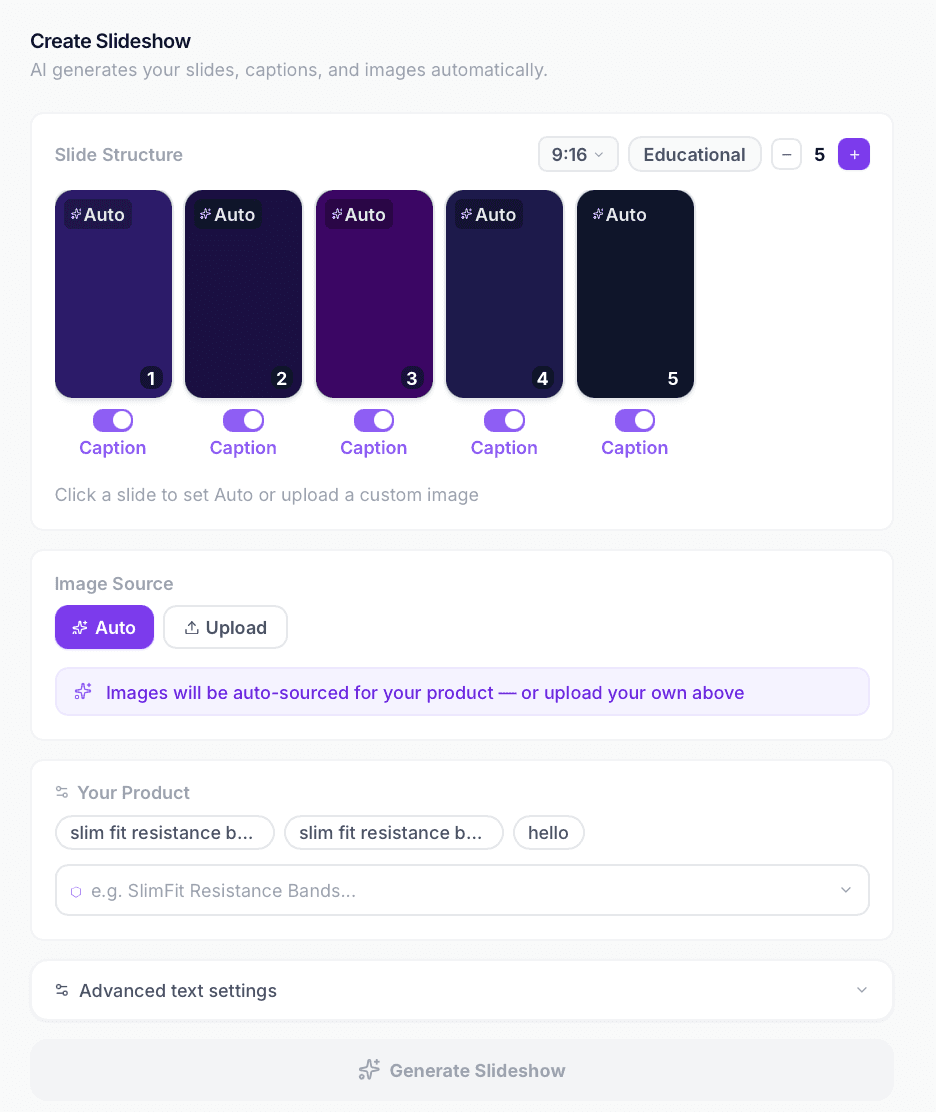
Schedule TikTok posts
weeks in advance.
Connect multiple TikTok accounts and schedule slideshows weeks in advance. Slyde handles smart time offsets, rate limits, and auto-retries so your content goes live exactly when your audience is most active — automatically.
See how it works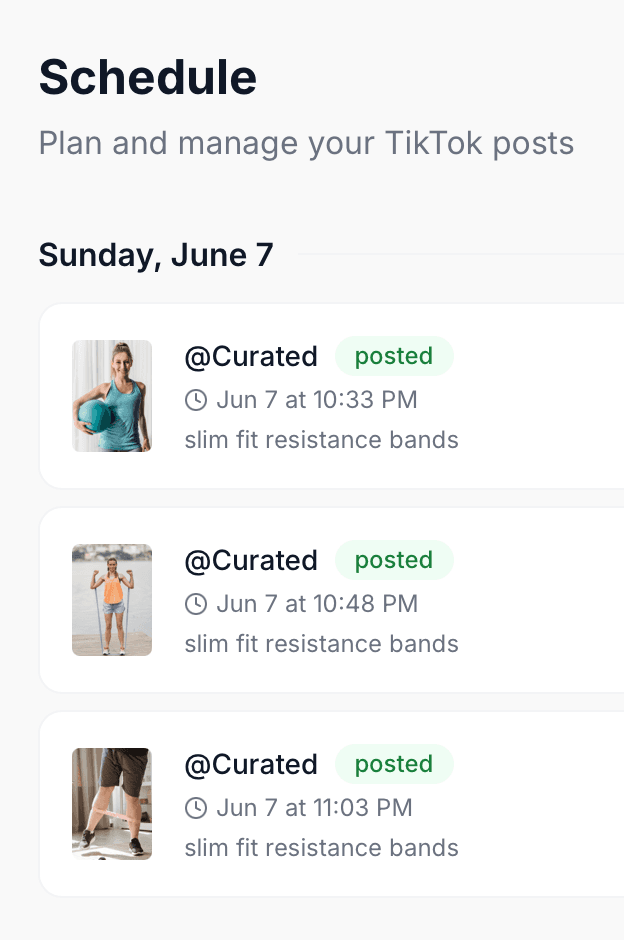
Text overlays baked
into every slide.
Your text overlays are composited directly onto each image before posting — exactly as you previewed them in the editor. No manual design work. What you see is what TikTok gets.
Start Today
Your AI growth team, built in
Slyde doesn't just make slideshows anymore — it plans your strategy, writes the content, and learns from what goes viral, then posts it for you.
AI Automation
Set your niche once. Slyde plans, creates, and posts your content every week — hands free.
Slyde Network
When a slideshow format goes viral, Slyde detects it and instantly rolls it out across all your accounts.
AI Account Manager
Get a weekly strategy brief for each account: what's working, what to post, and when to post it.
Template Library
12 proven viral slideshow formulas — hooks, transitions, and text styles that drive saves and shares.
Smart Scheduling
Posts go live at the exact moment your audience is most active, with randomised offsets to look natural.
Built for creators who post at scale
Everything you need to go from raw images to published TikTok slideshows — fully automated.
Automated
Set up once. Slyde handles the rest — forever.
Posts while you sleep
Scheduled posts go live automatically — even at 3 am. Slyde handles timing, retries, and rate limits for you.
Grow on autopilot
Watch follower count climb while Slyde keeps your queue full and posting on the perfect schedule.
Queue weeks of content
Batch-create 30 slideshows and schedule them all at once. Smart time offsets keep your cadence natural.
Run multiple accounts
Connect unlimited TikTok accounts. Perfect for agencies managing clients and creators running niche pages.
The full toolkit
Everything TikTok slideshows need. One dashboard.
No stitching together five apps. Build, schedule, generate, and measure — it's all in here.
TikTok slideshow builder
Build 9:16 photo carousels with custom text overlays on every slide. Preview exactly how it looks before posting.
Schedule TikTok posts
Schedule slideshows days or weeks in advance. Posts go live automatically at the exact time you set.
Multi-account management
Connect and manage multiple TikTok accounts from one dashboard. Starter: 3 accounts. Agency: unlimited.
AI content generation
Generate TikTok captions, hashtags, hook text, and full weekly content plans via AI in seconds.
Bulk carousel creation
Create dozens of slideshow variations at once with different images, text, and hooks. Built for high-volume posting.
TikTok analytics
Track follower growth, best posting times, and per-video performance across all connected accounts.
See what Slyde creates
These slideshows were generated in seconds — images imported, text overlaid, ready to post.

linen sets under $35 exist and they look expensive 🌿
@stylebylaura
linen sets are having a moment and they should be 🌿 #fashion #summeroutfits #ootd
Original sound · @stylebylaura

your squat is hurting your knees, here's why 👇
@liftwithalex
most people skip this and wonder why their squat hurts 😬 #fitness #gym #squatform
Original sound · @liftwithalex

garlic butter pasta in 8 min — 4 ingredients 🍝
@eatwithsophie
garlic butter pasta that takes 8 minutes and tastes like a restaurant made it 🍝 #foodtok #easyrecipes
Original sound · @eatwithsophie
Generated with AI captions, automatic text overlays, and smart scheduling — in under 60 seconds.
Product walkthrough
See the entire pipeline,
in under a minute.
From building your first carousel to scheduling across accounts and reading the analytics — here's a real walkthrough of Slyde, start to finish.
Slyde vs. everything else
They sell scheduling.
We ship the whole pipeline.
Buffer, Later, and Metricool are solid general-purpose schedulers. None of them generate your TikTok content, source your images, or detect what's about to go viral. Slyde does all of it — build, generate, schedule, post, and learn — in one TikTok-first system.
TikTok carousel / slideshow scheduling
AI-generated hooks, captions & slide text
Automatic image sourcing
Text overlay compositing on every slide
Template Library — viral content formulas
Automation campaigns + batch generation
AI Account Manager — weekly strategy briefs
Slyde Network — viral breakout detection
Multiple TikTok accounts
Auto-posting — no manual push required
TikTok analytics & performance reporting
Built TikTok-first, not bolted on
Starting price / mo
✓ = full feature · ~ = partial / limited version · — = not offered. Pricing as advertised on each vendor's site at time of writing.
Frequently asked questions
Everything you need to know about TikTok scheduling and automation with Slyde.
Does Slyde post directly to TikTok?+
Yes. Slyde connects to your TikTok account via the official TikTok Content Posting API. You authorise your account once and Slyde handles all posting from there.
Can I schedule TikTok posts in advance?+
Yes. Slyde lets you schedule TikTok photo slideshows days or weeks in advance. Once scheduled, posts go live automatically at the time you choose — no manual action required on posting day.
Does Slyde support TikTok photo slideshows and carousels?+
Yes — TikTok photo slideshows are Slyde's primary format. You build multi-image carousels with text overlays on each slide, and Slyde posts them via TikTok's official API in the correct photo slideshow format.
Where do the images come from?+
Slyde pulls images from a curated image database. Search by keyword or niche and we handle the rest — downloading, deduplicating, and queueing them for your slideshows.
Is this safe to use with my TikTok account?+
Slyde uses TikTok's official API — the same integration used by major scheduling tools. We don't use bots, browser automation, or unofficial methods. Your account stays safe.
How does the AI automation work?+
You describe your product or niche, set a posting frequency (1–6 posts/day), and Slyde's AI generates a full week of TikTok carousels automatically every Monday — hook text, slide captions, images, and all. Posts go live on schedule without any manual work.
Can I manage multiple TikTok accounts?+
Yes. Starter supports 3 accounts, Growth supports 15, and Agency supports unlimited accounts. All accounts are managed from one dashboard with independent posting schedules.
Can I cancel anytime?+
Yes. Cancel from your account dashboard in two clicks — no hoops, no emails, no phone calls required.
Do I need any video editing experience?+
None at all. Slyde builds the slideshow for you — just pick your images, choose a template, and hit publish. The whole process takes under 5 minutes.
Your next 30 days of TikTok
content, on autopilot.
Every plan starts full-access from day one. If it's not saving you hours a week, cancel in two clicks — no call, no email.
Make 5 TikToks — FreeNo card required · No hidden fees · Cancel anytime